Ever heard of the Google Web Fonts API? Stumbled across this while looking for something else.
Could be useful when trying to find that “perfect font” for your new website. Oh and the new font selector website is pretty cool.
Ever heard of the Google Web Fonts API? Stumbled across this while looking for something else.
Could be useful when trying to find that “perfect font” for your new website. Oh and the new font selector website is pretty cool.
I’ve read about it before countless times before, but I haven’t had a phone capable of running it. This morning while drinking my tea I read yet another post about Google Goggles and decided to install it on my HTC Wildfire.
I have only one word to explain it… “AWESOME”.
It reminds me of the handheld gadgets they use in shows like CSI where they take a photo of something (fingerprint, shoe print etc) and then click a button and the phone magically does some recognition and comes back with the info. It’s not perfect… and doesn’t recognise all the logos I had in the office but it does a pretty good job none the less.
And now with Google Images supporting reverse searches (search for an image using an image) it could only get better.
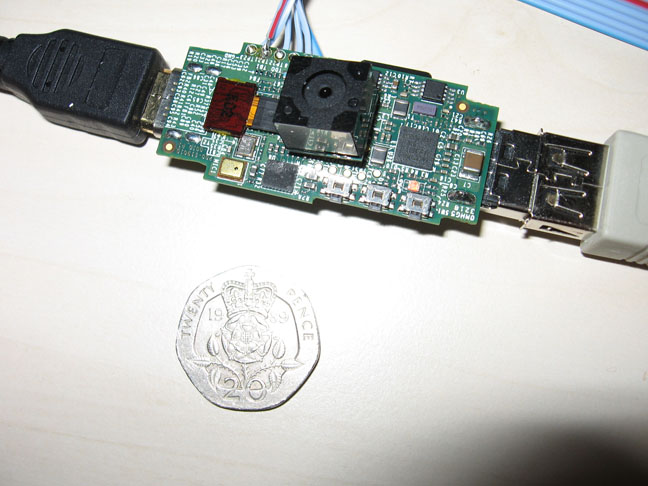
Found this on the Make Zine site, more info on Geek.com site or the Raspberry Pi Foundation site.
Awesome little machine with rather impressive specifications.
Provisional specification
700MHz ARM11
256MB of SDRAM
OpenGL ES 2.0
1080p30 H.264 high-profile decode
Composite and HDMI video output
USB 2.0
SD/MMC/SDIO memory card slot
General-purpose I/O
Open software (Ubuntu, Iceweasel, KOffice, Python)
I wish I could get a device like this in South Africa for R 250.00 ($25.00 estimated price in the article.)
I wonder if the hardware is good enough to run XBMC…
Yesterday I upgraded to the new Firefox 4…
I must say that it does look nicer than the old Firefox, unfortunately a little out of place on my Windows XP desktop but not too bad. Unfortunately it feels very sluggish, switching between tabs is rather slow and so is scrolling in pages. The worst though is that any longish textarea like the comment boxes in Facebook and the WordPress “Add New Post” page is very slow. On some pages I’m able to type about 10x faster than its able to put the characters on the screen.
I’m still not sure if loading of pages is faster and if there is a speed up in the Javascript engine I haven’t noticed it yet.
For the moment I’m going to give Firefox 4 a good chance to redeem its self and use it for a few more days… If I don’t grow to love up I’m switching back to Firefox 3 or moving over to Google Chrome.
There is some confusion in the comments of the post about whether or not this is Wikileaks HQ or just a data center that they use. But the place is cool, reminds me of a James Bond villains lair.
Found this on a friend’s Buzz page, rather scary.
Basically these guys offer access to a cluster that has been specifically fine tuned for cracking WPA encryption keys for wireless networks and at the cheapest price it’ll cost $17. I’ve seen people online build machines with multiple graphics cards and then run the code on them as well as the CPU as the graphics cards (Nvidia is the example I read) are faster at doing the math the desktop CPU’s.
Should we all panic? Well if you read the FAQ on the site you’ll see that WPA encryption is still a little hard to crack, changing the SSID of the access point to something unique makes it harder and so does choosing a non-dictionary password for the WPA key.
This guy has made an awesome Iron Man suit War Machine suit, one of the best ones I’ve seen online.

Sorry guys I should’ve realised that this is not Iron Man but rather War Machine, but still its impressive.
This afternoon I drowned my mouse with a cup of tea and killed it. The mouse was a Microsoft Wireless 4000 Notebook Optical Mouse which I’ve had for over 2 years and liked a lot… Electronics + tea don’t mix
As previously promised on Google Buzz, I’m going to “autopsy” the mouse and see if I can revive it, below are the photos (gadget lovers may want to look away).
I’ve killed or nearly killed a few peripherals with tea… the trick to keeping things alive is to disconnect power ASAP after the spill, hopefully before things short out and the magic smoke gets let out.
After yesterdays post about Xerox making copies of documents for the CIA during the cold war a friend sent me a link to this site (SeeingYellow).
For those of you who don’t know about this there is a conspiracy theory (which I actually think may be true) about how printer companies make their printers print mysterious yellow dots in certain places in order to allow law enforcement agencies to track down the source of the printout.
In the days of things like type writers it was actually possible to match a particular type writer to a particular page by the printing as each type writer had a slightly different wear pattern on the letters, it was even possible in the days of dot matrix printers to still do this although I’m not entirely sure how reliable this is. Of course its much harder to do this with modern printers as there is no “wear pattern” or anything that acts as a fingerprint.
I love these kinds of conspiracy theories… Like the governments have nothing better to do than track down who printed what… obviously the way to prevent them tracking you down is don’t print anything or use someone else’s printer.
A client had a problem with “stuck” email in there inbox, we’re not exactly sure what caused this but there were about 60+ emails waiting in there email box all of about 3MB and all the exact same and they just never downloaded. (Mail is downloaded via Outlook using a pop3 account)
This has been a rather common occurrence lately with email accounts hosted in the US. Our normal method of fixing this is log in via the ISP’s webmail front end, go through the mail and delete any messages that are “junk”. Unfortunately that did not work, the minute the Inbox was opened the page would sit trying to download and then finally timeout.
It was time to use some knowledge that I acquired in my “younger days” when I hung around the darker parts of the web… you can access a POP email account using Telnet, the big advantage of using telnet is that you never download the message, in fact you don’t even have to see the message to be able to delete it. The downside is that telnet is not the easiest tool to use to read your email, you basically have to stick in all the raw POP commands from the specification in order to login and access your email account and manipulate the emails.
I don’t remember all the commands for POP servers but the basics on this page were enough for me to delete the offending emails and fix the problem.
While fun and not particularly dangerous, this is not something for your typical “user” as it involves command lines, typing often blindly at prompts and careful typing to ensure you make no mistakes as back space often doesn’t work.